


Conference System
-
![SC-6233C SC-6233D Wired Conference Microphone System]() SC-6233C SC-6233D Wired Conference Microphone SystemSC-6233C SC-6233D Conference Discussion Unitread more
SC-6233C SC-6233D Wired Conference Microphone SystemSC-6233C SC-6233D Conference Discussion Unitread more -
![SC-6223C SC-6223D Wired Conference Microphone]() SC-6223C SC-6223D Wired Conference MicrophoneSC-6223C SC-6223D Conference Discussion Unitread more
SC-6223C SC-6223D Wired Conference MicrophoneSC-6223C SC-6223D Conference Discussion Unitread more -
![SC-6200M Digital Conference Microphone Controller]()
-
![SC-3793C/SC-3793D Embedded Conference Chairman/ Delegate Unit (With 1.77 Inch TFT Display, 5-Key Voting)]() SC-3793C/SC-3793D Embedded Conference Chairman/ Delegate ...Embedded strong anti-static design, ergonomic, with modern tech aesthetics.read more
SC-3793C/SC-3793D Embedded Conference Chairman/ Delegate ...Embedded strong anti-static design, ergonomic, with modern tech aesthetics.read more -
![SC-A204U UHF Wireless Conference With 4 Mic]() SC-A204U UHF Wireless Conference With 4 MicThe 4.3-inch TFT color display enables real-time monitoring of 8 channels, showing channel numbers, volume levels, operating frequencies, RF power, and audio waveforms. All settings can be easily...read more
SC-A204U UHF Wireless Conference With 4 MicThe 4.3-inch TFT color display enables real-time monitoring of 8 channels, showing channel numbers, volume levels, operating frequencies, RF power, and audio waveforms. All settings can be easily...read more -
![SC-A208U UHF Wireless Conference With 8 Desktop Mic Unit]() SC-A208U UHF Wireless Conference With 8 Desktop Mic UnitThis advanced UHF wireless receiver system is engineered for reliable, high-performance audio transmission in demanding professional environments. Featuring intuitive dual displays and...read more
SC-A208U UHF Wireless Conference With 8 Desktop Mic UnitThis advanced UHF wireless receiver system is engineered for reliable, high-performance audio transmission in demanding professional environments. Featuring intuitive dual displays and...read more -
![SC-A402U UHF Wireless Conference With 2 Desktop Mic Unit]() SC-A402U UHF Wireless Conference With 2 Desktop Mic UnitDesigned for modern conference rooms, board meetings, and multi-speaker environments, this advanced wireless conference system delivers exceptional audio clarity, robust signal stability, and...read more
SC-A402U UHF Wireless Conference With 2 Desktop Mic UnitDesigned for modern conference rooms, board meetings, and multi-speaker environments, this advanced wireless conference system delivers exceptional audio clarity, robust signal stability, and...read more -
![SC-A404U UHF Wireless Conference With 4 Desktop Mic Unit]() SC-A404U UHF Wireless Conference With 4 Desktop Mic UnitEngineered for modern conference rooms, large meeting halls, and professional presentation spaces, this robust 4-channel wireless conference system delivers unparalleled audio stability and...read more
SC-A404U UHF Wireless Conference With 4 Desktop Mic UnitEngineered for modern conference rooms, large meeting halls, and professional presentation spaces, this robust 4-channel wireless conference system delivers unparalleled audio stability and...read more -
![SC-A408U UHF Wireless Conference With 8 Desktop Mic Unit]() SC-A408U UHF Wireless Conference With 8 Desktop Mic UnitThe 4.3-inch TFT color display enables real-time monitoring of 8 channels, showing channel numbers, volume levels, operating frequencies, RF power, and audio waveforms. All settings can be easily...read more
SC-A408U UHF Wireless Conference With 8 Desktop Mic UnitThe 4.3-inch TFT color display enables real-time monitoring of 8 channels, showing channel numbers, volume levels, operating frequencies, RF power, and audio waveforms. All settings can be easily...read more -
![Wired Network Conference Microphone SC-6273C2 SC-6273D2]() Wired Network Conference Microphone SC-6273C2 SC-6273D2Single network port connection mode is adopted, which is convenient for standardized engineering wiring installation and later maintenance, 48K sampling rate, 60Hz-18KHz bandwidth, and perfect...read more
Wired Network Conference Microphone SC-6273C2 SC-6273D2Single network port connection mode is adopted, which is convenient for standardized engineering wiring installation and later maintenance, 48K sampling rate, 60Hz-18KHz bandwidth, and perfect...read more -
![Wired Network Conference Microphone SC-6273C SC-6273D]() Wired Network Conference Microphone SC-6273C SC-6273DSingle network port connection mode is adopted, which is convenient for standardized engineering wiring installation and later maintenance, 48K sampling rate, 60Hz-18KHz bandwidth, and perfect...read more
Wired Network Conference Microphone SC-6273C SC-6273DSingle network port connection mode is adopted, which is convenient for standardized engineering wiring installation and later maintenance, 48K sampling rate, 60Hz-18KHz bandwidth, and perfect...read more -
![SC-3773C/D Voting Smart Conference Microphone]() SC-3773C/D Voting Smart Conference MicrophoneSC-3773C/D Smart Full-digital Desktop Conference Unit ( With voting)read more
SC-3773C/D Voting Smart Conference MicrophoneSC-3773C/D Smart Full-digital Desktop Conference Unit ( With voting)read more


Why Choose Us
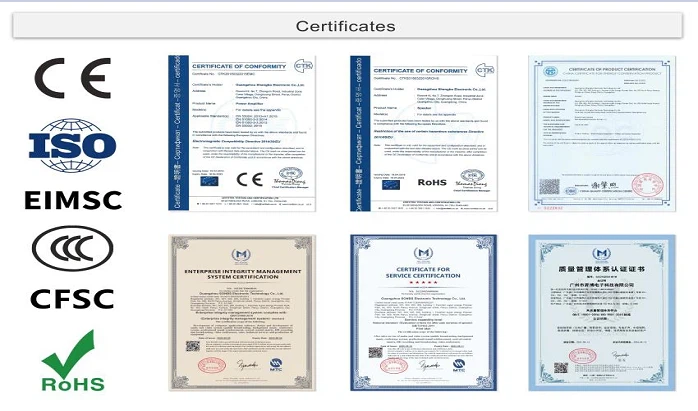
Our Certificate
ISO, CE, ROHS, EIMSC, CCC, CFSC.
Factory strength
SONBS Owns 3 Factories, 1 Marketing Technology Service Center And Over 15 Sub-Office.
Professional Team
Our professional engineer team will help partners to make turn-key solution for projects, improve solution until the customer is satisfied, and answer all technical questions.
Provide technical training
Our professional engineer team can offer technical training and guide the customer to install equipment, for big project, we can send engineer on site to guide the installation.
What is Conference System
Literally, the conference system is a complete set of audio equipment to assist the participants in a conference to communicate comfortably, so that everyone participating in the conference can “hear” and “speak” clearly. The most notable device in a conference system is the microphone, so most people call a conference system a “conference microphone system.”
Benefits of Conference System
Save meeting time
When everyone has a personal microphone on the table, it definitely avoids wasting unnecessary time on the transmission of the microphone. At the same time, when the microphone is activated, the light on the microphone will be lit, so you can clearly know who is talking, saving the time to identify the speaker. During the meeting, 1 minute saved is a considerable time saving for all.
Optimize meeting flow
The conference microphone system has functions such as mute, volume adjustment, speaking time control, and voting, which allows the chairman to carefully control the conference, identify the speakers, and proceed the meeting smoothly.
Enlarge engagement
Conference microphone system helps participants to easily engage in the discussion. At the same time, the use of amplifiers, speakers, and other equipment allows a wider audience to pay attention to or engage in the content of the conference. This is critical in municipal meetings.
Integrate simultaneous interpretation
In international conferences, multi-language speaking and simultaneous interpretation are essential. The conference microphone system can be integrated with synchronous interpretation equipment, which transmits signals directly to the interpreter for translation without interruption.
Aesthetics
Each participant's position has a professional gooseneck or table-top microphone that makes the whole meeting professional, marking the importance of meeting topics and expressing the speaker's commitment.
Types of Conference System

Video conferencing
Video conferencing is a communication technology that connects two or more users wherever they are located. With video conferencing, people can communicate using integrated audio and video and collaborate on shared files and documents.

Audio conferencing
Audio conferencing is a technology that allows people to communicate with each other using only their voices. This technology is often used for business or personal purposes.
Web conferencing
Web conferencing is a technology that allows people to communicate with each other using their computers. This technology is often used for business or educational purposes.
Necessary Functions of Conference System
HD Video
HD is a must to enhance immersion and boost employee engagement. They expect to see clear, crisp images, not pixelated blurs that are supposed to be their coworkers or online instructors. That said, slow internet connections can compromise the picture quality. So, provide some pre-event instructions to ensure that everyone gets the best viewing experience, for example, mention the minimum tech requirements such as supported devices and ideal bandwidth.
Screen Sharing
The screen sharing feature allows participants to cast whatever is on their screen in real-time, which is ideal for task walk-throughs and team troubleshooting. They can also reference documents to get peer input. For instance, your L&D graphic designer shares their work-in-progress and asks for revision notes. You can also use this during live events to teach employees how to access online training resources or master new tool features.
Recording
Maybe an employee can't make it to the meeting, or you want to expand your online training library quickly and cost-effectively. This video conference app feature gives you the opportunity to record your event and send users the link. You can also edit the footage and upload it to your repository in the form of a webinar. Another option is to break it into bite-size modules for JIT support. Just make sure the new software is compatible with your rapid authoring tools. That way, you can add transitions and visuals before you upload it to your library.
Brand Integration
Many modern video conferencing systems allow you to incorporate your own branding elements such as your logo and color scheme. As such, you can develop webinars and workshops that align with your image. But it also makes your meetings with clients and external partners more professional. Ask vendors about white labeling and customization options beforehand. Better still, include this feature in your RFP.
Voice Over Internet Protocol (VoIP)
VoIP lets participants switch between audio calls and video conferencing without any lag time. The sessions are hosted online, which also improves accessibility. For example, employees log in to the platform using their mobile device. Halfway through the voice chat, they need to share their screen. So, they enable the webcam and give peers a brief presentation. Other participants can choose whether to switch on video or stick with audio based on their personal preferences.
Live Chat
Whether they need to share resource links or communicate with peers (minus mics), live chat features are a must-have. This is also ideal for large group meetings because everyone can provide input without chaos ensuing, for example, everyone trying to speak at once and drowning each other out. In some cases, the instructor or presenter might also mute everyone else's microphone so that they can focus on the subject matter, and live chats give them the chance to actively participate.

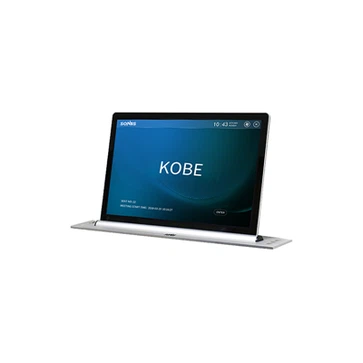
The shell of the embedded turnover all-in-one machine is made of aluminum alloy, the surface treatment is sandblasting and anodizing, and the turnover design.
Adopt 15.6/17.3/18.5/21.5-inch high-definition LCD screen with resolution of 1920 × 1080 dpi. The screen viewing angle is IPS full-view LCD screen with clear and bright display effect.
The embedded flip all-in-one machine has no exposed connecting wires, no connecting backplane, and no exposed screws, so as to ensure the overall beauty of the lifting display touch screen.
The overturning all-in-one machine supports 232 and 485 control, software control and manual control. The control software supports PC installation and is compatible with common operating systems. It can be controlled in a unified way or in any group to control the lifting, pausing, descending and other motion States of the lifter.
Flip all-in-one machine has: up, pause, down, multimedia conference terminal switch interface;.
With power protection function, USB information interface is preset on the desktop panel of the lifter, which supports the import and export of documents.
Team meetings
Tired of being left out, talked over, or misheard during digital meetings? The basic video conference call experience isn't suitable for a productive business meeting environment. One forward-facing camera cannot capture an entire conference room full of people.A standard microphone will also fail to produce loud and clear audio on the receiving end of the conversation. Your team's time is too important to have to repeat themselves constantly. The information being discussed in meetings is too important to risk questionable sound quality. Your remote folks deserve the same experience as your in-office team, so give it to them!
Webinars
The entire premise of a webinar requires high-quality visual and audio input. Your viewers are watching because they need the information you have. If your video doesn't support the sharing of HD visuals or doesn't sufficiently capture the room you are in, then your watchers become listeners.If your audience wanted to listen to information, they would have just selected a podcast on the topic. Likewise, if your participants can't understand what you are saying, you' aren't fully engaging with them.When you take the audio aspect away from your presentation, you enter a vast pool of competing visual and audio-visual content. To provide a complete AV experience to your webinar participants, you need to be equipped with the right set of equipment.
Product demos
Every aspect of your company is represented in your products. Just think about all of the brainstorming sessions, design work, and manufacturing hours that have been spent to launch your merchandise.Now imagine that a sales pitch flopped, and all of that hard work was for naught because you didn't have the proper video conferencing equipment to truly capture the full detail of your product. This scalable solution will also save your business money if virtual demos can replace costly onsite visits (or at least partially replace them).
One-on-one training + support
Whether you're providing onboarding training for a new employee or offering real-time support for a major client, every digital interaction your company conducts can either be choppy and unproductive or as seamless and efficient as an in-person meeting.The difference lies within the video conferencing technology you invest in. Unless you have high-quality video conferencing equipment, your company won't be able to provide a top-notch 24/7, anytime, anywhere communication stream between teams and customers. You will also widen your applicant pool for support representatives by offering remote roles that can be done from anywhere.
Job interviews
The typical hiring process can be laborious. Each day you go without your new hire, you're not only missing out on that position's productivity, but you're missing out on the productivity of any interviewers involved in the hiring process.High-quality, instant communication solutions, like video conferencing tools and tech, allow both current team members and potential new hires to quickly conduct an efficient yet substantial interview. Not only will remote meetings be convenient, but through the use of video conferencing tech, interviewers will be able to obtain key visual cues from the interview that offer the same insights as an in-person interview.
Components of Conference System
Chairman unit
Chairman can identify the speakers, remind them the speaking time, and organize voting. Therefore, the chairman has a special microphone called “chairman unit”, which has more functions, such as muting the speaker and changing the discussion order. These functions can help the meeting go smoothly and make attendees focus more on the discussion.
Delegate unit
Delegate unit usually has a one-key speech button, which will be identified by a light signal when it is activated. Some delegate units may have functions such as volume control or voting buttons.
Central control unit (ccu)
This device can control all microphone units, including the chairman unit and delegate units . It integrates microphone sound input, audio signal transmission, mute and speech order mode settings, advanced voting functions, etc. It also determines how many chairman and delegate units can be accommodated. It's the core or brain of a conference microphone system (know more about bxb's conference system.)
Room Size and Layout: The size of your conference room or workspace plays a crucial role in determining the right system. Larger rooms may require more advanced audio and video capabilities to ensure everyone is visible and audible.
Audio Quality: Clear audio is vital for productive meetings. Look for systems with noise-canceling technology and multiple microphones to capture voices from different areas of the room.
Video Quality: High-definition video is essential to read facial expressions and non-verbal cues. Consider systems that support at least 1080p resolution for a crisp and clear visual experience.
Integration: Ensure that the system integrates smoothly with your existing software and hardware. Compatibility with popular video conferencing platforms like Zoom, Microsoft Teams, or Google Meet is crucial.
Ease of Use
A user-friendly interface and intuitive controls are essential to avoid technical glitches that can derail meetings and halt productivity.
Connectivity
Reliable internet connectivity and the ability to seamlessly connect with remote participants is fundamental.
Security
Prioritize systems with robust security features, including encryption and user authentication, to protect sensitive conversations and data.
Conference System Troubleshooting Methods


Intuitive method
It is a method to detect and eliminate obstacles through human eyes and sensory organs. First, go from the outside to the inside, and observe the status of the equipment indicator lights, whether the buttons are damaged, whether the internal parts are burned or deformed, and whether there are sparks or burning smell after powering on. The intuitive method is simple and fast, and is suitable for general faults and damaging faults. Visual inspection requires the inspector to have certain equipment foundation, professional knowledge, and practical operation ability.
Resistance method
Use the ohm range of the multimeter to test the changes in the electronic resistance of the device. The resistance method is one of the most basic methods of inspecting equipment. The inspection parts include: Key inspection of switches, quality inspection of original components, and continuity inspection of connectors. The resistance method is very effective for electronic faults within equipment. During the inspection process, the online test method is often used first, and then after the problem is discovered, the parts are disassembled and tested again. The power must be turned off during online testing to avoid affecting the test results and damaging the testing equipment.
Galvanic method
By detecting the operating current of transistors and integrated circuits. One of the fault detection methods for conference equipment is to judge each local current and power load current. When detecting electronic circuits, you can quickly find out the reasons for crystal heating and power transformer heating. You can also detect the working status of each electronic and integrated circuit. The current method is also one of the commonly used detection methods. It is also necessary to cut off the power during the testing process to avoid affecting the test results, equipment detection damage, etc.
How to Maintain Conference System
Power management
Make sure the power cable of the conference system is well connected to avoid power problems that may cause the equipment to fail to start or work properly. At the same time, try to avoid using non-original power adapters to prevent unstable voltage from causing damage to the equipment.
Update drivers
Regularly updating the driver of the conference system can ensure the stability and compatibility of the device. Many devices may experience performance degradation or incompatibility with the operating system after being used for a long time. These problems can be solved by updating the driver.
Back up important data
For meetings using electronic equipment, such as projectors, screens, etc., regular backup of important data can prevent data loss due to equipment failure. At the same time, for recording equipment, important recording files can also be backed up to the cloud or computer.
Regular cleaning
Regular cleaning and maintenance of the conference system can prevent dust and dirt from affecting the performance of the equipment. For example, projector lenses, screen whiteboards, etc. need to be wiped regularly with a clean cloth to maintain their clarity and sensitivity.
Equipment inspection
Before each meeting, perform routine inspections of equipment to ensure it is functioning properly. This includes checking things like your projector's lamp life, your screen's folding and flattening capabilities, and your recording device's battery and storage space.
Software update
Similar to drivers, software updates can improve device performance and compatibility. Especially for older devices, regular software updates can bring new life to them.
Our Factory
SONBS owns 3 factories, 1 marketing technology service center and over 15 sub-office ,covering a total area of more than 50,000 square meters. We have 50 R&D engineers, 100 pre-sales and after-sales technicians, 250 sales and 200 assembling workers, all totally about 600 employees.


certificate

FAQ
As one of the most professional conference system manufacturers in China, we're featured by quality products and good service. Please rest assured to buy customized conference system at competitive price from our factory.