


Video Conference System
-
![SV-MCU800 Video Conference Cloud Service Platform]() SV-MCU800 Video Conference Cloud Service PlatformSV-MCU800 128/96/64/48 HD Video Conference Cloud Service Platform (128/96/64/48-channel MCU)read more
SV-MCU800 Video Conference Cloud Service PlatformSV-MCU800 128/96/64/48 HD Video Conference Cloud Service Platform (128/96/64/48-channel MCU)read more -
![SV-MCU500 Video Wall Server]()
-
![SV-HD81S(B) Video Conference Terminal]() SV-HD81S(B) Video Conference TerminalSV-HD81S(B) HD Video Conference Terminal (9-channel HDMI signal input + 3-channel HDMI signal output)read more
SV-HD81S(B) Video Conference TerminalSV-HD81S(B) HD Video Conference Terminal (9-channel HDMI signal input + 3-channel HDMI signal output)read more -
![SV-HD80S (60) HD Video Conferencing Terminal]()
-
![SV-HD80S (B) Luxury HD Video Conference Terminal]() SV-HD80S (B) Luxury HD Video Conference TerminalSV-HD80S (B) Luxury HD Video Conference Terminalread more
SV-HD80S (B) Luxury HD Video Conference TerminalSV-HD80S (B) Luxury HD Video Conference Terminalread more -
![SV-HD80S (4) SV-HD80S (8) SV-HD80S (16) Built in MCU Video Conferencing Terminal]() SV-HD80S (4) SV-HD80S (8) SV-HD80S (16) Built in MCU Vide...SV-HD80S (4)/SV-HD80S (8)/SV-HD80S (16) HD Video Conferencing Terminal (Built-in MCU)read more
SV-HD80S (4) SV-HD80S (8) SV-HD80S (16) Built in MCU Vide...SV-HD80S (4)/SV-HD80S (8)/SV-HD80S (16) HD Video Conferencing Terminal (Built-in MCU)read more -
![SV-HD80S(D)Intelligent Video Conferencing Terminal]() SV-HD80S(D)Intelligent Video Conferencing TerminalSV-HD80S(D) Integrated Intelligent HD Video Conferencing Terminal (Fixed Focus + Built-in MIC Array)read more
SV-HD80S(D)Intelligent Video Conferencing TerminalSV-HD80S(D) Integrated Intelligent HD Video Conferencing Terminal (Fixed Focus + Built-in MIC Array)read more -
![E9090 All-in-one Interactive Flat Panel]() E9090 All-in-one Interactive Flat PanelE9090 65'' Tablet All-in-one Interactive flat panelread more
E9090 All-in-one Interactive Flat PanelE9090 65'' Tablet All-in-one Interactive flat panelread more -
![SC-OPSI3 OPS Computer]()
-
![SV-30U Conference Omnidirectional Microphone]()
-
![SV-20U Desktop Omnidirectional Microphone]()
-
![SV-20U Omnidirectional Microphone]()




Why Choose Us
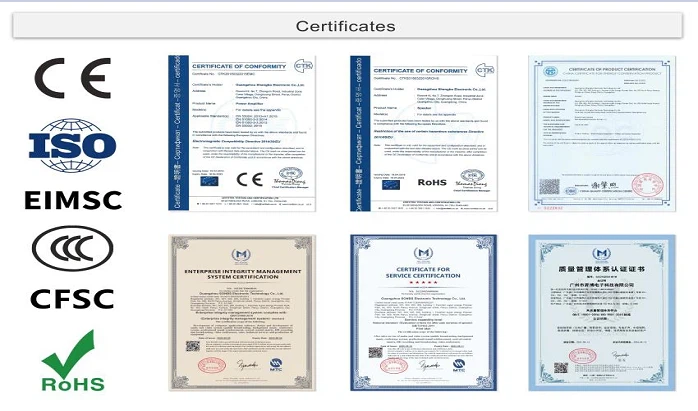
Our Certificate
ISO, CE, ROHS, EIMSC, CCC, CFSC.
Factory strength
SONBS Owns 3 Factories, 1 Marketing Technology Service Center And Over 15 Sub-Office.
Professional Team
Our professional engineer team will help partners to make turn-key solution for projects, improve solution until the customer is satisfied, and answer all technical questions.
Provide technical training
Our professional engineer team can offer technical training and guide the customer to install equipment, for big project, we can send engineer on site to guide the installation.
What is Video Conference System
Video conferencing systems, which allow many users in different locations to have video or audio conversations at the same time, are simply an online communication solution. While video conferencing solutions that offer high audio and video quality transmission to users in different locations included technologies that only allowed video calls in the first years, they are preferred by those who prefer corporate video conferencing solutions for their benefits and usage habits with their user-friendly interfaces and features that support effective presentation techniques in the coming years. has been.
Benefits of Video Conference System
Improves communication
Whether you're a small business owner or part of a large company, clear communication is critical to understanding projects, setting expectations, and meeting your goals. Video Conference System can help: A report by Forbes tells us that “humans process visual far faster and more aptly than text or audio.” And, relative to audio conferencing, “62 percent of executives agree that Video Conference System significantly improves the quality of communication. In addition, 50 percent of those surveyed believe Video Conference System also improves the degree of understanding.” With the ability to maintain a visual on other people in the meeting, participants will be more engaged, multi-task less, and set themselves up to process and understand more clearly.
Helps build relationships
When you meet face-to-face, you can make a personal connection, pick up on verbal and non-verbal cues, and begin to build trust. And while there may be critical connections that you'll need to travel for, Video Conference System can help bridge the gap for all other meetings, while still helping you connect on a personal level with customers, teammates, and remote workers alike. For the skeptics among us, research shows that Video Conference System is widely regarded as a useful tool and helps people build relationships inside and outside their companies.
Saves money
By giving your team a simple way to meet face-to-face, Video Conference System system delivers a collaborative,“in-person”experience without the expense of travel. That means no airfare required for training, conferences, big meetings, and all gatherings in between—so you can focus precious resources elsewhere. Plus, with the power to meet virtually, you can hire the best talent and allow them to work anywhere. And once you get comfortable with the technology, it may even inspire you to expand your remote workforce—so you can bring on top talent no matter where they live and gain an advantage over your competition. A comprehensive solution like Microsoft Teams provides video, audio, chat, screen sharing, recording, and more under a single UI. This helps you avoid juggling multiple vendors or wasting valuable time switching between services or troubleshooting issues.
Saves time
Because you can meet virtually anywhere, video conferencing technology allows you to save travel time—so you can spend less time getting to meetings and more time focused on more pressing work. But it can also help you save time in other ways. By hosting a meeting rather than working through an issue via email, it can eliminate the disruption of a barrage of messages, reduce confusion (and the need for lengthy discussions), and get your team aligned faster, helping to reduce the amount of time it takes to complete projects or tasks.
Types of Video Conference System
Telepresence Video Conferencing System
Telepresence is designed to host a meeting as closely as possible. Even if the participants are not in the same room physically,the set-up is done in a way easily. Large screens are used and cameras are positioned at eye level. The result is a videoconference set-up that appears as if all the participants are sitting in the same room and around the same table.
Integrated Video Conferencing System
Integrated video conferencing systems are designed generally for group video conferencing where there's a centralized location for the equipment. It include both the hardware and codec. All the main camera,displays and other peripheral videos are mounted in the main conference location. Integrated video conferencing systems are typically ideal for boardroom and classroom conferences.
Desktop Video Conferencing System
As an important one of types of video conferencing systems,desktop video conferencing system is very popular with people on-the-go and typical office workers. Within this option there are two choices available: a software client on your desktop or a hardware codec that doubles as your computer monitor. By using this type of set-up,the video conferencing system is brought right into your personal computer while still pulling off a full-motion conference.
Service-based Video Conferencing System
For serviced-based systems,the provider,which often is a telecom carrier,handles majority of the control when it comes to the network set-up. This means less work on your end. You just pay for the solution and your provider manages it for you making more convenient especially if you don't want to bother with the technicalities.
Application of Video Conference System
Education industry
The application of video conferencing systems is particularly prominent in the field of education, including distance teaching, teacher training, academic exchanges, and education management. Through the video conferencing system, teachers can conduct remote teaching to students across the country, achieving a "face-to-face" interactive classroom experience and improving learning efficiency. In addition, teacher training, academic conferences and teaching experience exchanges can also be organized to promote the sharing and exchange of educational resources.
Medical industry
The applications of video conferencing systems in the medical field include telemedicine, clinical teaching, etc. Through the video conferencing system, doctors can observe and teach surgeries remotely, improving the efficiency of medical education and training. Software such as Beta app provides powerful video conferencing services for medical institutions, supports remote audio and video interaction, and improves conference efficiency.
Government agencies
The application of video conferencing systems in government agencies includes meetings, teaching, and training of superior leaders and grassroots units. It not only saves a lot of travel expenses, manpower and material resources, but also improves work efficiency and communication effects.
Enterprise applications
By using video conferencing systems, enterprises can save a lot of travel expenses, manpower and material resources, while improving work efficiency and collaboration capabilities. The computer-based software video conferencing system provides functions such as electronic document reading, data transmission, and collaborative work, and has the advantage of low construction cost.
Components of Video Conference System



Video input
This will consist of two or more webcams or video cameras used to record individuals, groups, or props in a video conference. These cameras can be integrated with the computers or set up to be used remotely such as in the centre of a room or in front of a flip chart or other item that is required in the conference. Users may also use digital projectors or interactive whiteboards.
Video output
This is hardware that will display the video feed from the other user. This piece of equipment will display what is happening and will show individuals or props. These normally come in the form of computer monitors, screens, televisions, or projector displays.
Audio input
In a successful video conferencing setup, a system will usually include either a selection of microphones, located in the center of the room or positioned in front of the individuals involved. Users may also use wireless headsets or any other compatible forms of audio input.
Audio output
Successful video conferencing systems will usually include professional quality speakers positioned around the room, built in laptop or computer speakers, or dedicated headphones.
Echo reduction software
This allows real-time conversation to happen successfully, eliminating audio delays and echo sounds minimizing the risks of misunderstanding and misinterpretation. Some systems may even implement echo canceling microphones (ECM) or employ the use of headphones to cancel out surrounding sound that may conflict with what is being said.
Stable network connection
Nowadays, video conferencing platforms usually rely on high-speed broadband or fiber optic connections which are more than capable of handling the data transfer rate. In some circumstances, LAN and even ISDN (Integrated Services Digital Network) connections may be used. It is important to ensure you are using a high-speed Internet provider to make sure you do not experience problems such as glitchy video or audio feeds or lag in conversation.
Codec
Considered one of the most crucial elements of video conferencing systems, video and audio codecs are responsible for compressing and decompressing the data that is sent during a conference. When speaking into a webcam and microphone, the codecs compress the data into digital packets which are then sent to the user on the receiving end and decompressed and displayed in their correct format. It is important to make sure the codecs in video conference packages are compatible as some providers will not work properly with others.
How to Choose Video Conference System
Consider your video conferencing needs
Do you need video conferencing software for short one-on-one meetings, or will you use it for more extended client or vendor meetings? Your answer to this question can help you decide whether to accept a lower-cost platform with shorter meeting time limits and fewer advanced features. Other considerations, such as whether you'll need screen-sharing or webinar features, can also help you narrow your choices.
Research the market for video conferencing services
A few brands might immediately come to mind when you think of video conferencing services. However, big-name brands aren't your only options, and other platforms may suit your needs better.Researching the video conferencing market can yield unique solutions that may be right for your organization. For example, some platforms may be superior for one-click meeting access, while others may seamlessly integrate video conferencing with meeting-notes technology.
Compare video conferencing contenders' video quality
A video conferencing platform with all the features you could ask for means little if the video is low-quality. Some prominent video conferencing platforms offer paid plans with a quality of 720p, which is on the high end. Consider prioritizing these platforms in your decision-making process.
Review video conferencing contenders' integrations
A video conferencing service that integrates with your other software platforms will be easier to use across the board. For example, some video conferencing services integrate with the best online project management platforms and the best HR software to streamline communication. Consider how the integrations available for each potential platform might put it a step above the others.
Weigh video conferencing solutions' prices against features
Ask yourself whether a video conferencing platform's price justifies its included features. Better yet, ask how this price compares with those of other platforms and their offerings. Your goal should be to balance your budgetary concerns with the features you need from your video conferencing platform.
Read customer reviews of various video conferencing services
Video conferencing services' official websites can only tell you so much; after all, they're designed to paint the platform in a flattering light. Customer reviews may give you a more honest perspective because most reviewers have no incentive to share falsely positive commentary.Look at whether most reviews say the product is worth its price, name any notable flaws or speak to the brand's customer service. If negative customer reviews give you pause, read another brand's reviews. They may be more positive, giving you a superior option.
Step-by-step guide to setting up a Video Conference System

Pinpoint locations
You'll need to locate the nearest facilities based on their proximity to each of your participants. Ideally, you'll want to find the ones that multiple people can reach from a reasonable distance. Check out the location finder to accomplish this preliminary step. It's also worth noting that if you're interested, our site has the same function for looking up the higher-end telepresence facilities.

Choose chairperson(s) and learn equipment
As previously noted in our blog, it's good to have some heads of the meeting to keep things running smoothly. At this point it would behoove you to research some video conferencing tips and tricks. You can find some of these in previous blog posts right here. Additionally, you'll want to make sure that at least you and the other chairperson(s) know how to use the equipment. It shouldn't be hard, but it's necessary. If needed, you can book extra time before the meeting to practice.

Set a date and time
You'll need to cross-check your books with the openings listed on whyGo's booking system and find a date and time when every location you're using is open and all of your participants are free. This may end up being the hardest part!

Prepare the meting and its materials
We can safely assume you have your own goals and guidelines for this video conference, so all that's left to do is finalize this information and prepare any data or presentations you might be offering.
Do not attempt to repair all the equipment that constitutes the system by yourself, and strictly follow the operation manual for system use and maintenance.
When disconnecting all the lines, hold the connector to insert and remove. Do not use brute force to pull the cable. Before connecting the cables, make sure that the two connectors are oriented correctly and aligned.
In order to avoid possible electric shock events, do not connect or disconnect any cables of the system during thunderstorms, and do not attempt to electrify and install the equipment of the system.
Most of the equipment of the video conferencing system has undergone strict electromagnetic radiation (EMC) or similar safety verification. Generally, it will not cause interference to other electronic products. However, when the system needs to add electronic equipment, please pay attention to the product. Whether it has been verified by similar tests to avoid interference with existing systems.
Please keep all equipment ventilated smoothly, otherwise it may cause short circuit of the internal components of the equipment and cause fire or electric shock, and may even cause the whole system to collapse.
After the conference system or accessories are turned off, do not try to restart immediately. The projector must wait for the cooling fan to completely stop running to restart. Other electronic equipment restart intervals are recommended to be no less than 3 minutes.
Our Factory
SONBS owns 3 factories, 1 marketing technology service center and over 15 sub-office ,covering a total area of more than 50,000 square meters. We have 50 R&D engineers, 100 pre-sales and after-sales technicians, 250 sales and 200 assembling workers, all totally about 600 employees.


certificate

FAQ
As one of the most professional video conference system manufacturers in China, we're featured by quality products and good service. Please rest assured to buy customized video conference system at competitive price from our factory.