


Mixer
-
![16-Channel Mixer With Built-in 2*250W Amplifier]() 16-Channel Mixer With Built-in 2*250W AmplifierBuilt-in amplifier : Integrated 2×250W/4Ω amplifier, capable of driving speakers directly without an external power amplifier.read more
16-Channel Mixer With Built-in 2*250W AmplifierBuilt-in amplifier : Integrated 2×250W/4Ω amplifier, capable of driving speakers directly without an external power amplifier.read more
Input channels: Multiple mono input channels allow... -
![12-Channel Mixer With Built-in 2*250W Amplifier]() 12-Channel Mixer With Built-in 2*250W AmplifierBuilt-in amplifier : Integrated 2×250W/4Ω amplifier, capable of driving speakers directly without an external power amplifier.read more
12-Channel Mixer With Built-in 2*250W AmplifierBuilt-in amplifier : Integrated 2×250W/4Ω amplifier, capable of driving speakers directly without an external power amplifier.read more
Input channels: Multiple mono input channels allow... -
![6-Channel Mixer With Built-in 2*250W Amplifier]() 6-Channel Mixer With Built-in 2*250W AmplifierBuilt-in amplifier : Integrated 2×250W/4Ω amplifier, capable of driving speakers directly without an external power amplifier.read more
6-Channel Mixer With Built-in 2*250W AmplifierBuilt-in amplifier : Integrated 2×250W/4Ω amplifier, capable of driving speakers directly without an external power amplifier.read more
Input channels: Multiple mono input channels allow... -
![8-Channel Mixer With Built-in 2*250W Amplifier]() 8-Channel Mixer With Built-in 2*250W AmplifierBuilt-in amplifier : Integrated 2×250W/4Ω amplifier, capable of driving speakers directly without an external power amplifier.read more
8-Channel Mixer With Built-in 2*250W AmplifierBuilt-in amplifier : Integrated 2×250W/4Ω amplifier, capable of driving speakers directly without an external power amplifier.read more
Input channels: Multiple mono input channels allow... -
![SD-16T 16 Channel Mixer]()
-
![SD-16-4 SD-24-4 SD-32-4 Karaoke Mixer]() SD-16-4 SD-24-4 SD-32-4 Karaoke MixerSD-16-4/SD-24-4/SD-32-4 4-Group 16/24/32-Channel Mixerread more
SD-16-4 SD-24-4 SD-32-4 Karaoke MixerSD-16-4/SD-24-4/SD-32-4 4-Group 16/24/32-Channel Mixerread more -
![SD-32T Mixer Audio Professional]()
-
![SD-24T Professional Mixer]()
-
![SD-16-4U 16 Channel Rack Mixer]()
-
![SD-12-2U 12 Channel Rack Mixer]()
-
![SD-16P SD-24P SD-32P Audio Mixer]()
-
![SD-8P SD-16P SD-24P SD-32P Digital Mixer 24 Channel]() SD-8P SD-16P SD-24P SD-32P Digital Mixer 24 ChannelSD-8P/SD-16P/SD-24P/SD-32Pread more
SD-8P SD-16P SD-24P SD-32P Digital Mixer 24 ChannelSD-8P/SD-16P/SD-24P/SD-32Pread more
8/16/24/32-Channel Digital Mixer


Why Choose Us
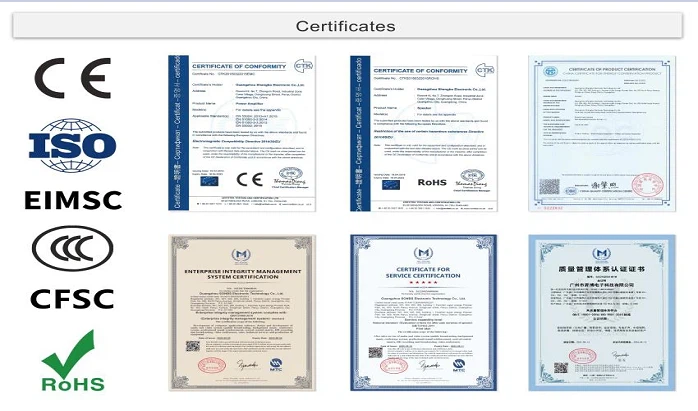
Our Certificate
ISO, CE, ROHS, EIMSC, CCC, CFSC.
Factory strength
SONBS Owns 3 Factories, 1 Marketing Technology Service Center And Over 15 Sub-Office.
Professional Team
Our professional engineer team will help partners to make turn-key solution for projects, improve solution until the customer is satisfied, and answer all technical questions.
Provide technical training
Our professional engineer team can offer technical training and guide the customer to install equipment, for big project, we can send engineer on site to guide the installation.
What is Mixer
A mixer is an electronic device used in the professional audio field to mix, route, and adjust volume, timbre, dynamic range, etc. of audio signals. Depending on the model, the mixer can be used for analog signals and digital signals. Finally, the adjusted signals are combined together to become the composite output signal. Mixing consoles are used in many places, such as recording studios, public address systems, sound reinforcement systems, radio, television, film post-production, etc.
Benefits of Mixer
Controlling Dynamic Range
A good audio mixer will manage the volume of each track component to make sure it's in line with the artist's distinct vision, achieving measured balance and preventing clipping. Using compressors, limiters, and balancing various track components, they achieve a pleasant listening experience.
Balancing Frequencies & Blends
Volume is just one component of a well-mixed track. Considering the presence and clarity of the entire audio spectrum will achieve a better track. Measuring equalization, boosting frequencies, and creating a balanced sound allows every element to blend well together without losing out the intricacies of each contributing instrument. You might liken this to a great chef using disparate flavors to achieve a delicious meal while still ensuring those flavors can be identified.
Achieving Clarity
Highlighting important elements, making sure each track is as clean and defined as possible (unless the opposite effect is intended), and making fine-tuned adjustments such as light autotuning work can achieve clarity in the track. You might liken this to a photographer touching up their image with creative intent in image editing software, such as increasing the contrast or reducing sharpness.
Retaining Creative Intent
An audio mixer will ensure the original creative intent of the artist is achieved. In some cases, this can even mean removing limiters for intentional distortion. Other examples of creative intent include low-fi music, including background noise, producer tags, intentional clutter, and more. They also remove elements that haven't been planned in advance.
Achieving Compatibility
Not all audio formats are alike. Many are lossy, and some are lossless, such as the difference between MP3 (and its various bitrates) and FLAC. A good audio mix will be calibrated to ensure compatibility with mono or stereo systems. Music may even be mastered for surround sound formats like DTS or Dolby Atmos.
Types of Mixer
Analog mixers
Analog mixers are great for live sound, and often for recording as well. For live sound, they require either powered speakers or an amplifier with non-powered PA speakers, plus the necessary cables for connecting your sources to the mixer.Analog mixers generally cost less than digital models, but they lack the automation and programmability you might need for complex shows and recordings. And there's no wireless remote control like you'd get with a digital mixer.
Powered mixers
A powered mixer is an analog mixer with built-in amplification. Powered mixers are compact, portable, and easy to set up. They work with non-powered PA speakers. They're great for band practice and smaller-room settings.Powered mixers aren't really designed for recording. That said, I once made an album using my old Yamaha EMX 66M to record the basic bass, guitar, and drum tracks live. We used four mics for the drums, one for the electric guitar, and plugged the bass straight into the mixer. I probably wouldn't do it again, but it had a listenable, retro-psychedelic garage-y sound.
Digital mixers
Digital mixers offer a wide range of control capabilities. You can save and recall setups, which is a big time-saver for bands that play the same rooms on a regular basis. This is also great for making quick scene-by-scene changes during theatrical productions.Most digital mixers feature wireless remote control. You can walk around a room while mixing on your smartphone or tablet, making sure the music sounds good everywhere.That makes it easier to get a good mix than if you're using an analog mixer and can only make changes from where it's stationed.
Application of Mixer
Mono sound reinforcement
In disco halls, dance halls or background music playing halls, mono sound amplification may be used. At this time, the mixer should be connected accordingly, and the auxiliary send (aux send) should be used to amplify the sound through the power amplifier and serial speakers.
Stereo sound reinforcement
In occasions such as OK halls, concert halls, karaoke halls, etc. that require stereo playback, use the left and right channels to output at the same time or use group outputs 1 and 2 or group outputs 3 and 4 to send out at the same time, through the power amplifier (connected to stereo mode) and the corresponding speakers Perform sound amplification.
Monitor
The mixer is also widely used in stage monitoring, that is, for stage performers to listen to the sound. The mixer's auxiliary send (aux send) is used to send the sound to the monitor amplifier and stage monitor speakers for playback.
Components of Mixer


Input Section
The input area of the channel strip may accept any or all of the following levels of signal: mic, instrument, -10 line level or +4 line level. Depending on which level of signal is desired to be accepted, specific knobs and/or switches must be engaged and used. For example, if a microphone is wired into a channel, the channel must be configured to accept mic level signal. Then, the mic pre knob must be raised in order to add gain to the signal.
EQ
Most mixers have an equalization (EQ) area on the channel strip. The amount of flexibility and precision of frequencies that can be adjusted in the EQ area is typically related to the overall sophistication of the board. For example, most budget and moderate-level mixers have fewer frequencies that can be targeted and adjusted with broad strokes, while high-end desks have EQ areas that can be used as a scalpel.
Dynamics
High-end mixers commonly have a “Dynamics” area, either on each channel or in the master section. Common dynamic effects included in this area are compressors and gates. When a switch is engaged to activate the dynamics area, the compressor will make the voice or instrument sound more even (loud parts become softer, soft parts become louder). The gate will open to allow any signal to pass through the channel, then close to keep out background noise and bleed.
Fader
The fader is the device that raises or lowers the amount of audible signal from the channel. A fader is actually a resistor: as it is lowered, it increases resistance. This is why the numbers start high at the bottom of the fader bank on each channel and decrease to the zero point (usually located about two-thirds of the way to the top).
Group Faders
Group faders on an audio mixer are used to control multiple channel faders at once. A common use for a group fader is to raise or lower all of the faders that contain drum signals together at once-the collective mix of the drum faders can be raised or lowered using a group fader (also referred to as a subgroup). If included in a console's construction, there may be anywhere from two to eight group faders.
Bus Assignment
A bus is no more than a path on which signal can travel. This is relatable to any bus driving down the street-and every bus needs a destination. (Here in Los Angeles, the buses stop before they drive into the ocean…most of the time.) The bus assignment area on a mixer is the same concept: we are sending signal down a path that leads to a destination. Common destinations are external pieces of gear, audio subgroups or an audio interface.
What Makes a Good Audio Mixer?
Price
While many audio mixers carry a hefty price tag, audio mixers are more accessible today than ever before thanks to advances in sound technology. “It's no longer about the cost of entry to the tools,” Rodd says. Higher-end mixers come with better circuitry that improves sound quality and effect functionality, but if you're podcasting, doing voiceover work, or making videos for social media, a less expensive mixer and DAW will suffice.
Audio quality
The best sound mixers enhance audio quality in a way that refines it for your specific sound requirements. If you plan on recording your own audio and want to use a DAW, look for software with integrated recording. Most modern DAW mixers have recording options built in as well as virtual instruments and effects. Look for at least 24-bit recording as a good benchmark of audio resolution.
Effects
While most mixers come equipped with signal processing effects onboard, they don't all have the same features or quality. If a mixer doesn't come with the effects you're looking for, such as reverb and delay, you'll need to add outboard gear to the signal chain—especially for analog mixers.
How to Choose Mixer
Number of channels
Consider how many inputs you will need to accommodate all of your audio sources.
Type of mixer
Decide whether you need an analog, digital, or hybrid mixer based on your specific needs.
Features
Consider what specific features are important to you, such as EQ, compression, reverb, and the ability to store and recall settings.
Connectivity
Make sure the mixer has the appropriate number of inputs and outputs for your needs, and check for compatibility with other equipment such as recording interfaces and PA systems.
Budget
Determine your budget and choose a mixer that fits within that budget while still providing the features and functionality you need.
Brand reputation
Consider the reputation of the brand, and read reviews from other users to get an idea of the mixer’s performance and reliability.
Size and portability
Consider whether you will be using the mixer in a fixed location or if you need something that is easy to transport.
Quality
Always check for the mixer’s sound quality, which should be transparent, precise and with a low noise floor.
Support
Consider the support offered by the manufacturer or seller, such as warranty and customer service.
How to Maintain Mixer
Use Fader Dust Covers
When your audio interface is not in use, consider using fader dust covers to protect the sensitive faders from dust and other particles. This simple step can prevent debris from setting into the faders and causing them to malfunction or become scratchy.
Avoid Spills
Keep liquids away from your soundboard at all costs. Accidental spills can quickly damage the internal components of the mixer and lead to costly repairs or replacements. If beverages are present in your studio or workspace, make sure they are securely placed and far from your equipment.
Monitor Temperature and Humidity
Extreme temperature and humidity levels can impact the performance and lifespan of your audio mixer. Store your DJ mixer in a controlled environment where the temperature and humidity are stable. Avoid placing it near heat sources or in direct sunlight, as this can cause components to overheat or degrade.
Secure Cables Properly
Improperly secured or tangled cables can strain the audio mixer's connectors and ports, leading to potential damage over time. Use cable ties or Velcro straps to keep your cables organized and neatly arranged behind your sound board. This not only protects your equipment but also makes troubleshooting easier.
Power Down Correctly
Always power down your audio mixer properly to prevent any sudden electrical surges or damage. Follow the manufacturer's instructions for shutting down the mixer, which usually involves turning down all volume levels, unplugging any connected devices, and switching off the power.
Regular Maintenance Checks
Perform routine maintenance checks on your Mixer to ensure everything is functioning correctly. Test each channel, knob, and fader periodically to identify any issues early on. Addressing small problems fast can prevent them from escalating into larger, more expensive repairs.
Our Factory
SONBS owns 3 factories, 1 marketing technology service center and over 15 sub-office ,covering a total area of more than 50,000 square meters. We have 50 R&D engineers, 100 pre-sales and after-sales technicians, 250 sales and 200 assembling workers, all totally about 600 employees.


certificate

FAQ
As one of the most professional mixer manufacturers in China, we're featured by quality products and good service. Please rest assured to buy customized mixer at competitive price from our factory.